The problem, before
In a property business, sales contracts are drafted by a third party. Before approving them, every detail has to be checked against the files: sales data, accounts, Excel tracking sheet, technical and land-registry documents, co-ownership rules, land references. The sources don’t share the same format or organisation, and checking takes a lot of time.
What the agent does, step by step
- You drop in the draft contract (PDF or Word) and state the file it relates to.
- The agent extracts the details to check: parties, unit, areas, price, payment schedule, references.
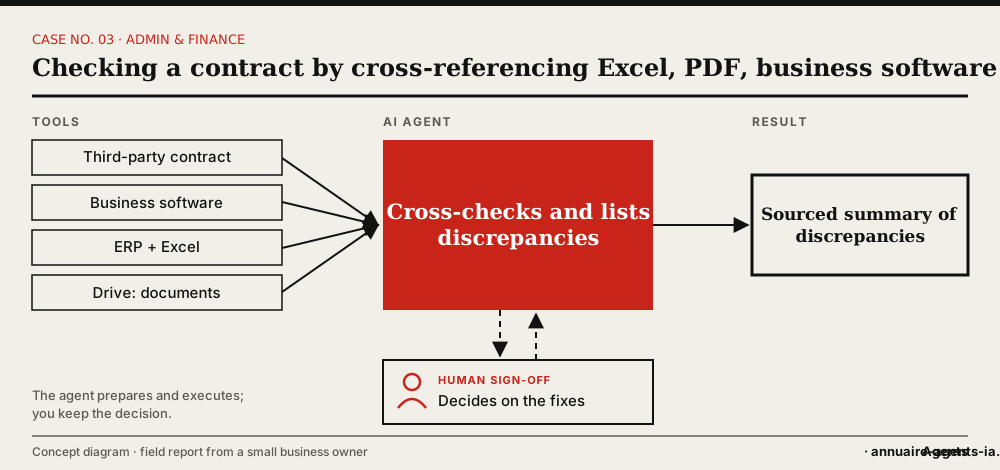
- It looks for the same information in the sales team’s tool, the accounting ERP, the Excel sheet and the documents on the drive.
- It compares each point and notes the source of each value.
- It returns a summary of discrepancies: what matches, what differs, what can’t be found.
- You review the discrepancies and ask the drafter for corrections.
The tools involved
- Contract in PDF or Word
- Sales team’s business software
- Accounting ERP (Odoo)
- Excel tracking sheet
- Drive: plans, land-registry documents, co-ownership, title deeds
The safeguards: what stays under human sign-off
- The agent never approves a contract: it produces a discrepancy report.
- Each finding cites the source and where the value was read.
- Read-only access to the business tools and the ERP.
- Exchanges with the contract’s drafter stay in your hands.
What it changes
- A systematic check, even when time is short.
- The points to fix stand out straight away, with their source.
- Scattered, loosely structured information finally becomes usable.
Benefits described by the owner, without measured figures.
In real life
This is the case that best sums up the approach: a business check that forces you to move between several tools. The work mainly consisted of specifying the sources, the items to check and the format of the result.
Which agents can do it?
 OpenClaw LivedLived: the owner set up this case with OpenClaw installed on a Mac mini.
 Hermes AgentOpen source, can run on your machine, messaging apps (including WhatsApp) and scheduled tasks.
 Grok BotCloud service with a browser, scheduled routines and approval before sensitive actions. No direct access to your local network.
 LegalflyFor pure legal analysis of the contract, alongside the cross-check.
 Tomorro (ex-Leeway)To centralise and track your contracts.
Inspired by the first-hand account of a small business owner who set up these uses with OpenClaw on a Mac mini. The other agents mentioned have the necessary capabilities according to their vendors; AgentsIA hasn’t tested them on these cases. No figures on gains are put forward.
How to start: the checklist
- List the details to check in a standard contract.
- State the reference source for each one.
- Give read-only access to the tools involved.
- Test on a contract already checked by hand and compare.
- Set the format of the summary (table: point, contract, source, discrepancy).
Before you start, read the 10 rules for delegating to an AI agent.