The problem, before
Documents going out to clients are far from the visual style guide. Everyone has their own habits, and enforcing the layout day to day is exhausting.
What the agent does, step by step
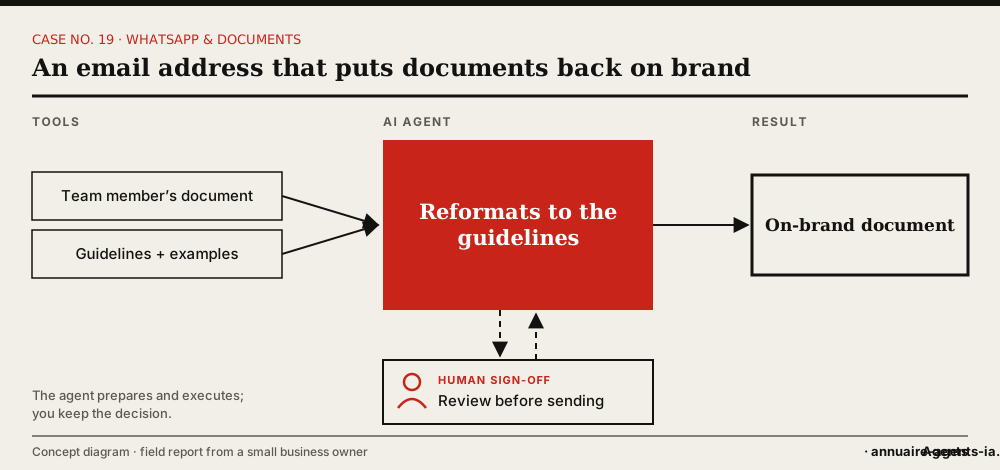
- The agent creates a dedicated address on the company’s domain.
- This address is connected to an AI service that knows your style guide.
- You give it the layout rules and dozens of reference documents.
- A staff member sends their document to the address.
- They get back a version that follows the style guide.
The tools involved
- Company email
- Visual style guide
- Reference documents
- Word processor and spreadsheet
The safeguards: what stays under human sign-off
- The staff member always reviews the version they receive before sending it to the client.
- Only internal addresses are accepted.
- The document’s content isn’t changed, only its layout.
What it changes
- A layout standard that can finally be applied day to day.
- A simple service, in a tool everyone uses.
- More consistent client documents.
Benefits described by the owner, without measured figures.
In real life
The simplicity of the final gesture rests on the time spent handing over: choosing the right examples, explaining the rules, looking at the results and refining the adjustments.
Which agents can do it?
 OpenClaw LivedLived: the owner set up this case with OpenClaw installed on a Mac mini.
 Hermes AgentOpen source, can run on your machine, messaging apps (including WhatsApp) and scheduled tasks.
 Grok BotCloud service with a browser, scheduled routines and approval before sensitive actions. No direct access to your local network.
 Canva (Magic Studio)For visual materials, as a complement.
Inspired by the first-hand account of a small business owner who set up these uses with OpenClaw on a Mac mini. The other agents mentioned have the necessary capabilities according to their vendors; AgentsIA hasn’t tested them on these cases. No figures on gains are put forward.
How to start: the checklist
- Gather the style guide and about twenty model documents.
- Create the dedicated address.
- Test on internal documents.
- Open the service to one team.
- Collect feedback and refine the rules.
Before you start, read the 10 rules for delegating to an AI agent.