The problem, before
Follow-up happens in WhatsApp groups: conversations, photos, attachments. Important information gets lost in the flow, and rereading hundreds of messages isn’t possible.
What the agent does, step by step
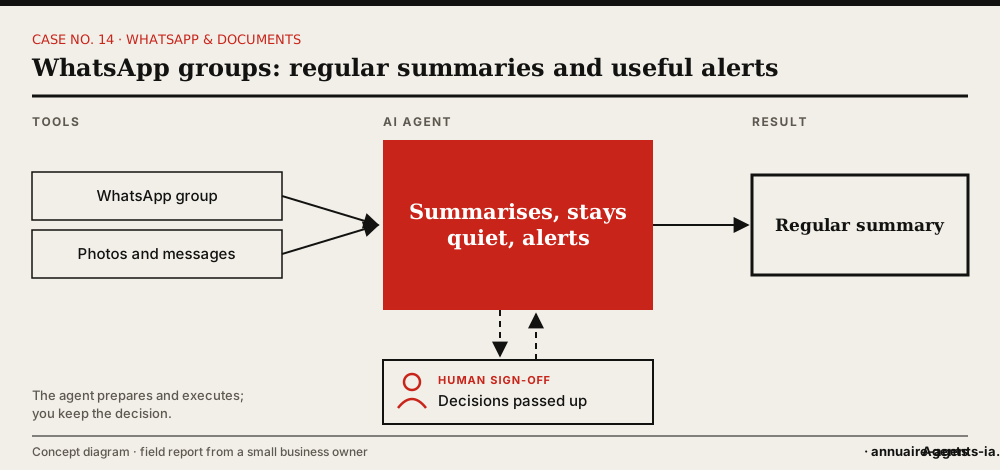
- The agent is added to the group and follows the conversation.
- It quietly handles whatever needs no reaction.
- It prepares a regular summary: progress, open points, decisions made.
- It alerts immediately when a decision is needed or there’s a significant anomaly.
- When you call on it in the group, it steps in.
The tools involved
- WhatsApp (groups)
- Message log
- Summaries folder
The safeguards: what stays under human sign-off
- Group members know an AI agent is following it.
- Written rules on what stays silent, what goes into the summary and what warrants an alert.
- The agent commits to nothing on the company’s behalf in the group.
What it changes
- The gist of a group without rereading everything.
- Pending decisions come up at the right moment.
- The agent steps in where the conversation is happening.
Benefits described by the owner, without measured figures.
In real life
The noise had to be dealt with: no description of each photo, no message for each upload. The first summaries were made from the history, before logging was working. Teaching it when to stay quiet was part of the work.
Which agents can do it?
 OpenClaw LivedLived: the owner set up this case with OpenClaw installed on a Mac mini.
 Hermes AgentOpen source, can run on your machine, messaging apps (including WhatsApp) and scheduled tasks.
Inspired by the first-hand account of a small business owner who set up these uses with OpenClaw on a Mac mini. The other agents mentioned have the necessary capabilities according to their vendors; AgentsIA hasn’t tested them on these cases. No figures on gains are put forward.
How to start: the checklist
- Choose a single group to start with.
- Let the members know.
- Write the silence / summary / alert rule.
- Set how often the summary goes out.
- Adjust after two weeks.
Before you start, read the 10 rules for delegating to an AI agent.