The problem, before
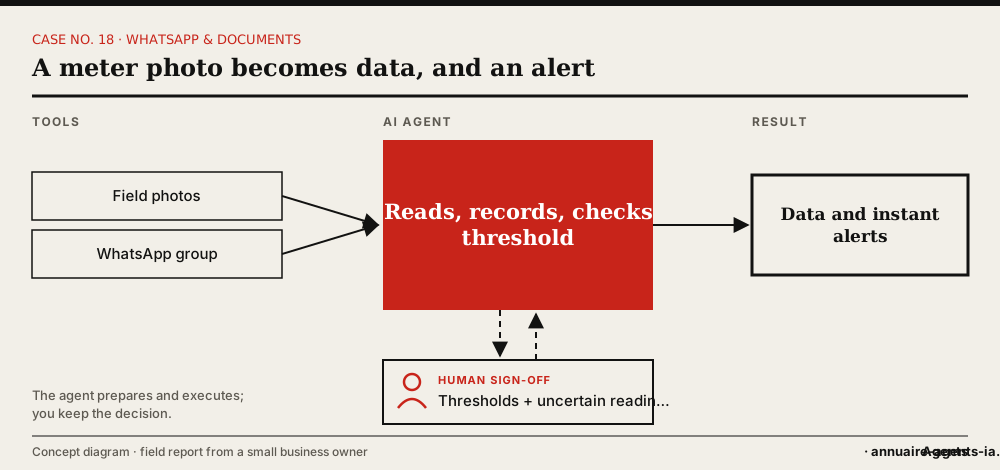
Every day, meter readings are photographed and sent to a WhatsApp group. But someone has to turn them into data first. Overruns are only discovered at the end of the month.
What the agent does, step by step
- The field team keeps taking the photo and sending it to the group; nothing changes for them.
- The agent reads each reading as soon as it’s sent.
- It records the value in the tracking table.
- It compares it with the threshold and alerts immediately if it’s exceeded.
- It produces a periodic summary.
The tools involved
- WhatsApp (readings group)
- Tracking table
- Alert thresholds
The safeguards: what stays under human sign-off
- An uncertain reading is flagged, not guessed.
- Thresholds are set by you.
- The original photo stays linked to each value.
What it changes
- Information available as fast as it’s collected.
- You react sooner, without waiting for the end of the month.
- No change of habits in the field.
Benefits described by the owner, without measured figures.
In real life
The case shows the value of starting from an existing habit: the readings already existed; only what came next was improved.
Which agents can do it?
 OpenClaw LivedLived: the owner set up this case with OpenClaw installed on a Mac mini.
 Hermes AgentOpen source, can run on your machine, messaging apps (including WhatsApp) and scheduled tasks.
Inspired by the first-hand account of a small business owner who set up these uses with OpenClaw on a Mac mini. The other agents mentioned have the necessary capabilities according to their vendors; AgentsIA hasn’t tested them on these cases. No figures on gains are put forward.
How to start: the checklist
- Spot a flow of photos that already exists.
- Create the tracking table.
- Set the alert thresholds and the recipient.
- Check the readings during the first week.
- Add the periodic summary.
Before you start, read the 10 rules for delegating to an AI agent.